Signatures, templates, macros, fonts, CalDav Synchronizer and every calendar and contact folder, moved in one go — without dragging gigabytes of mail along when the mail already lives on a server. Also exports contacts to CSV and calendars to .ics.
pictures and all
How-to
Before you start
Install Office Migrator on both PCs: the old one and the new one. Close Outlook on the old PC. Keep the old PC as it is until everything on the new one is checked.
1. Save from the old PC
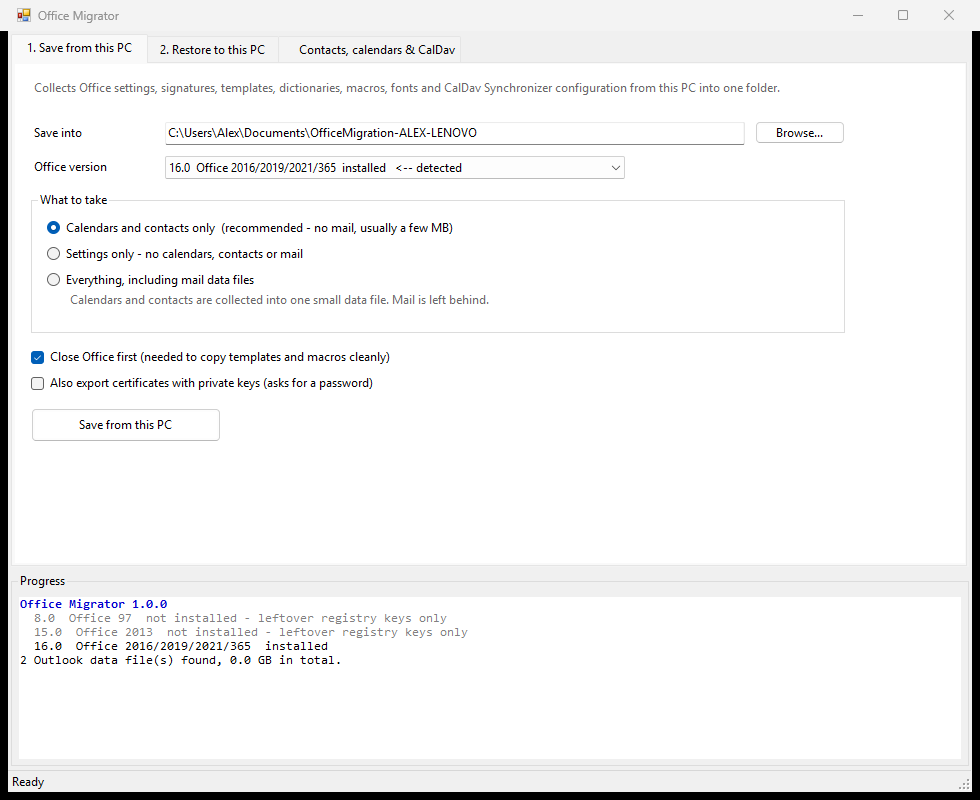
- Save into: a folder, ideally on a USB stick or network drive you can reach from the new PC.
- Office version: the one marked "detected" is the Office that is really installed.
- What to take: Calendars and contacts only is right for most people whose mail lives on a server: it gathers every calendar and contact folder into one small file. Everything also copies the mail data files, which can be very large.
- Click Save from this PC and watch the Progress panel.
2. Restore on the new PC
Install Office (and CalDav Synchronizer, if you use it) on the new PC, and start Outlook once so it sets up a mail profile. Then close Outlook.
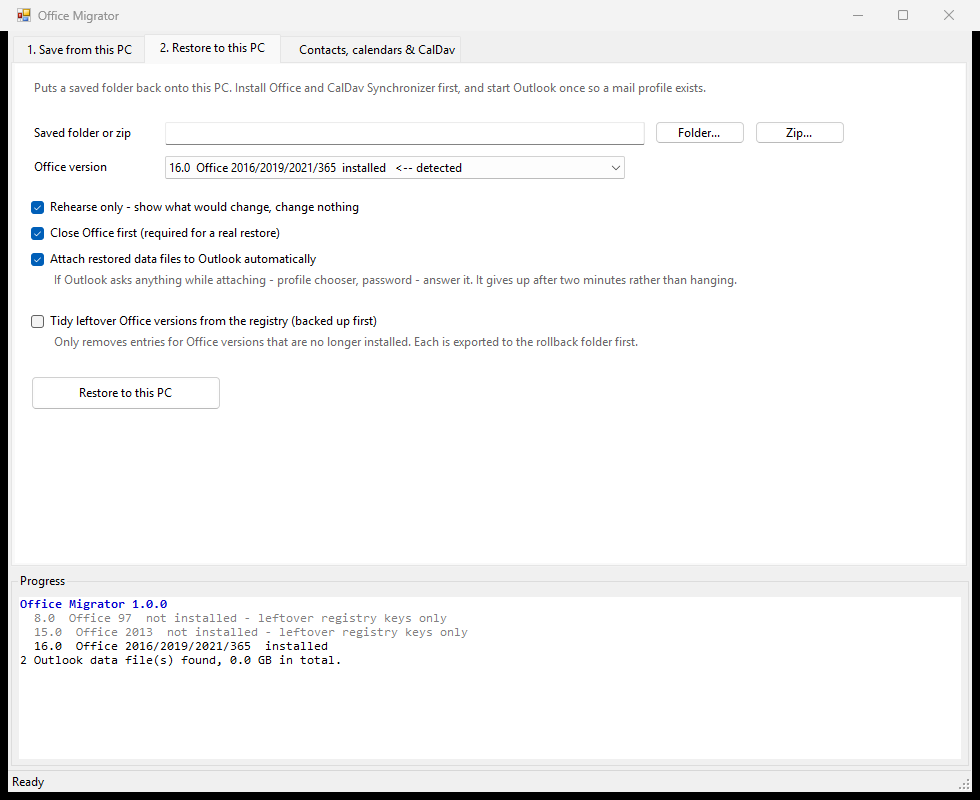
- Saved folder or zip: the folder you saved from the old PC.
- Leave Rehearse only ticked the first time and click Restore to this PC. The Progress panel shows what would change, and nothing is changed yet.
- Happy with it? Untick Rehearse only and click Restore to this PC again. Anything it overwrites goes into a rollback folder first, so it can be put back.
With Attach restored data files to Outlook automatically ticked, your calendars and contacts appear in Outlook by themselves. If Outlook asks a question while that happens (a profile or a password), answer it.
Calendars and contacts for other systems
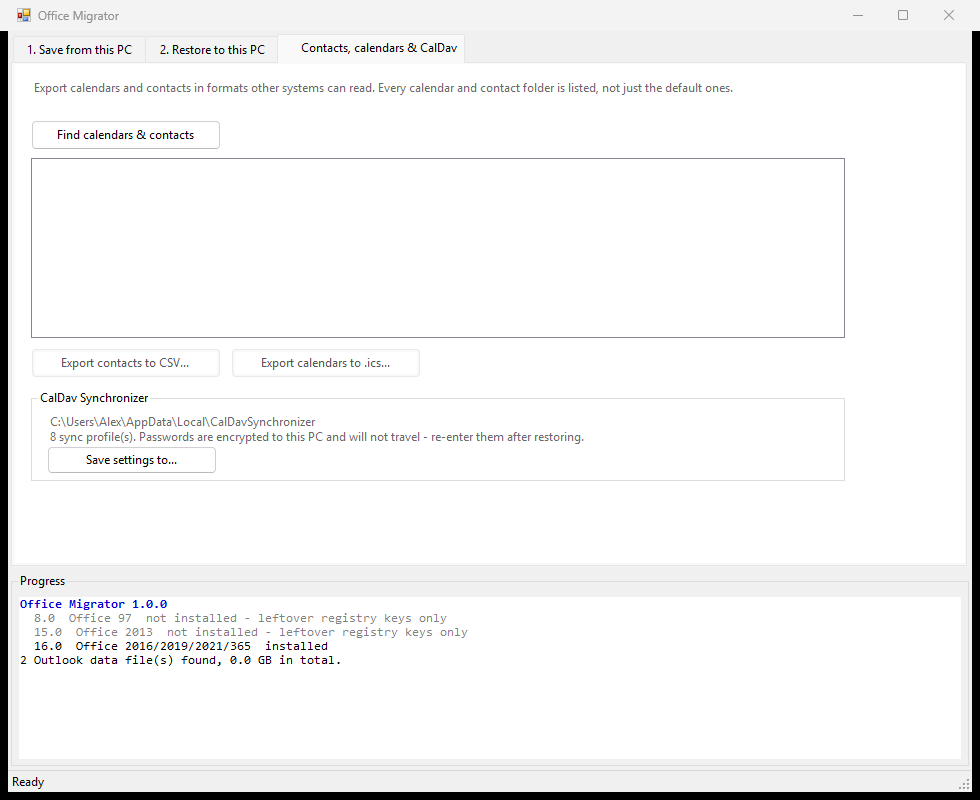
Find calendars & contacts lists every folder, including shared and extra calendars. Export contacts to CSV (for a spreadsheet or another mail system) or calendars to .ics (for Google, Apple or anything else).
If you use CalDav Synchronizer, Save settings to… keeps its set-up on its own. Its passwords don't travel, so enter them again on the new PC.
What it does
What Office Migrator does
Moving Office to a new PC
- Save from this PC collects Office settings, signatures, templates, dictionaries, macros, AutoCorrect, the ribbon layout, add-ins, your own fonts, trusted-publisher certificates and CalDav Synchronizer's set-up into one folder.
- Choose what travels: calendars and contacts only (the default: every calendar and contact folder gathered into one small data file, no mail), settings only, or everything including mail data files.
- Restore to this PC puts a saved folder (or zip) back. "Rehearse only" shows what would change without changing anything, everything it overwrites is kept in a rollback folder, and the restored calendars and contacts can be attached to Outlook automatically.
- Optionally tidies registry entries left by Office versions that are no longer installed (backed up first).
- Detects the Office that is really installed, ignoring leftover registry entries from old versions.
Calendars and contacts
- Lists every calendar and contact folder, not just the default ones, and exports contacts to CSV and calendars to
.icsfor other systems. - Saves CalDav Synchronizer's set-up on its own. Its passwords are encrypted to the old PC, so re-enter them after restoring.
Works on old machines
- Runs on Windows 7 SP1 and later with the .NET Framework that comes with Windows; Outlook 2010 to 365.
- Never needs administrator rights.
Known limitations
- Early release. The engine underneath has run real migrations, but the window's buttons haven't yet been put through a full migration. Keep the old PC as it is until the new one is checked, and please tell us how it went.
- Mail itself is moved only as whole data files ("Everything"); there's no export of single emails.
- Close Outlook before saving, or the calendars-and-contacts file may still be locked.
- Not code-signed yet, so Windows SmartScreen warns on first install.
newest first
Changelog
1.0.0 (05/10/2026)
- First release.
Support
Something not working, or an idea for it? Tell us here and a real person will write back.
Buy us a coffee
Office Migrator is free and stays free. If it has saved you some time, a coffee is a lovely way to say so.